웹 스크래핑 - 인터넷에서 데이터 수집하기
웹에는 무한한 데이터가 있습니다. 파이썬으로 원하는 정보를 자동으로 수집하는 방법을 배워봅시다.
웹 스크래핑이란?
웹 스크래핑(Web Scraping)은 웹 페이지에서 데이터를 자동으로 추출하는 기술입니다.
사람이 브라우저에서 복사-붙여넣기 하는 작업을, 프로그램이 대신 해주는 것이죠.
활용 예시:
- 뉴스 헤드라인 수집
- 상품 가격 비교
- 날씨 정보 가져오기
- 부동산 매물 모니터링
필요한 라이브러리 설치
pip install requests beautifulsoup4| 라이브러리 | 역할 |
|---|---|
| requests | 웹 페이지를 가져옴 (HTTP 요청) |
| BeautifulSoup | HTML을 파싱하여 원하는 데이터 추출 |
웹 스크래핑의 흐름
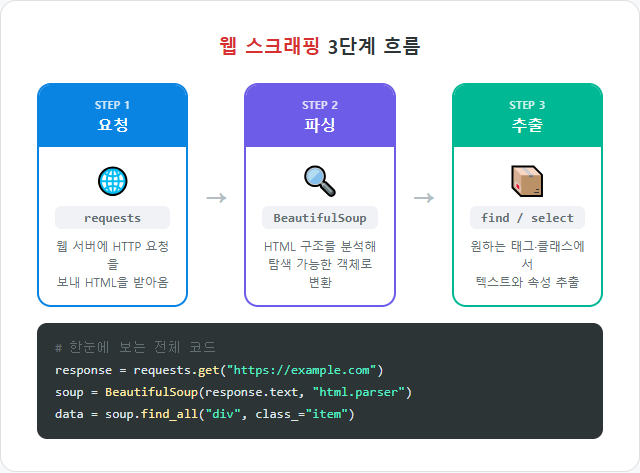
3단계로 이루어집니다:
- 요청(Request):
requests로 웹 페이지 가져오기 - 파싱(Parse):
BeautifulSoup으로 HTML 분석 - 추출(Extract): 원하는 데이터만 골라내기
1단계: 웹 페이지 가져오기
import requests

# 웹 페이지 요청
url = "https://example.com"
response = requests.get(url)

# 상태 코드 확인
print(response.status_code)  # 200이면 성공

# HTML 내용 보기
print(response.text[:200])  # 앞부분 200자만
주요 상태 코드
| 코드 | 의미 | 설명 |
|---|---|---|
| 200 | OK | 성공적으로 가져옴 |
| 403 | Forbidden | 접근 권한 없음 |
| 404 | Not Found | 페이지가 존재하지 않음 |
| 500 | Server Error | 서버 내부 오류 |
2단계: HTML 파싱하기
from bs4 import BeautifulSoup

html = """
<html>
<body>
  <h1>오늘의 뉴스</h1>
  <ul>
    <li class="news">파이썬 4.0 출시 예정</li>
    <li class="news">AI 기술 발전 가속화</li>
    <li class="ad">광고: 코딩 부트캠프</li>
  </ul>
</body>
</html>
"""

soup = BeautifulSoup(html, "html.parser")
주요 검색 메서드
# 태그로 찾기
title = soup.find("h1")
print(title.text)  # "오늘의 뉴스"

# 클래스로 찾기
news_list = soup.find_all("li", class_="news")
for news in news_list:
    print(news.text)
# 파이썬 4.0 출시 예정
# AI 기술 발전 가속화

# CSS 선택자로 찾기
items = soup.select("ul li.news")
for item in items:
print(item.text)| 메서드 | 설명 | 반환값 |
|---|---|---|
| find() | 첫 번째 일치 요소 검색 | 태그 객체 1개 |
| find_all() | 모든 일치 요소 검색 | 리스트 |
| select() | CSS 선택자로 검색 | 리스트 |
| select_one() | CSS 선택자로 첫 번째만 | 태그 객체 1개 |
3단계: 데이터 추출하기
# 텍스트 가져오기
tag = soup.find("h1")
print(tag.text)        # "오늘의 뉴스"
print(tag.get_text())  # 같은 결과

# 속성 가져오기
html2 = '<a href="https://python.org" class="link">파이썬 공식</a>'
soup2 = BeautifulSoup(html2, "html.parser")
link = soup2.find("a")

print(link["href"])     # "https://python.org"
print(link["class"])    # ["link"]
print(link.get("href")) # "https://python.org" (없으면 None)
실전 예제: 명언 수집하기
import requests
from bs4 import BeautifulSoup

# 1. 웹 페이지 가져오기
url = "https://quotes.toscrape.com/"
response = requests.get(url)

# 2. HTML 파싱
soup = BeautifulSoup(response.text, "html.parser")

# 3. 명언 추출
quotes = soup.find_all("div", class_="quote")

for i, quote in enumerate(quotes, 1):
    text = quote.find("span", class_="text").text
    author = quote.find("small", class_="author").text
    print(f"{i}. {text}")
    print(f"   - {author}")
    print()
실행 결과:
1. "The world as we have created it is a process of our thinking..."
   - Albert Einstein

2. "It is our choices, Harry, that show what we truly are..."
   - J.K. Rowling
...
여러 페이지 스크래핑
import requests
from bs4 import BeautifulSoup
import time

all_quotes = []

for page in range(1, 4):  # 1~3페이지
    url = f"https://quotes.toscrape.com/page/{page}/"
    response = requests.get(url)
    soup = BeautifulSoup(response.text, "html.parser")

    quotes = soup.find_all("div", class_="quote")
    for quote in quotes:
        text = quote.find("span", class_="text").text
        author = quote.find("small", class_="author").text
        all_quotes.append({"text": text, "author": author})

    time.sleep(1)  # 서버 부담 줄이기 (예의!)

print(f"총 {len(all_quotes)}개 명언 수집 완료!")중요:
time.sleep()으로 요청 간격을 두는 건 서버에 대한 예의이자 차단 방지 방법입니다.
수집한 데이터 저장하기
CSV로 저장
import csv

with open("quotes.csv", "w", newline="", encoding="utf-8") as f:
    writer = csv.DictWriter(f, fieldnames=["text", "author"])
    writer.writeheader()
    writer.writerows(all_quotes)

print("CSV 파일 저장 완료!")
JSON으로 저장
import json

with open("quotes.json", "w", encoding="utf-8") as f:
    json.dump(all_quotes, f, ensure_ascii=False, indent=2)

print("JSON 파일 저장 완료!")
웹 스크래핑 시 주의사항
| 항목 | 설명 |
|---|---|
| robots.txt 확인 | 사이트/robots.txt에서 크롤링 허용 범위 확인 |
| 요청 간격 지키기 | time.sleep()으로 서버에 부담 주지 않기 |
| 저작권 존중 | 수집한 데이터의 상업적 사용 주의 |
| 이용약관 확인 | 사이트 이용약관에서 스크래핑 금지 여부 확인 |
직접 해보기
문제 1: HTML에서 제목 추출
아래 HTML에서 모든 <h2> 태그의 텍스트를 추출하세요.
html = """
<div>
  <h2>첫 번째 장</h2>
  <p>내용...</p>
  <h2>두 번째 장</h2>
  <p>내용...</p>
  <h2>세 번째 장</h2>
  <p>내용...</p>
</div>
"""
정답 보기
from bs4 import BeautifulSouphtml = """
<div>
<h2>첫 번째 장</h2>
<p>내용...</p>
<h2>두 번째 장</h2>
<p>내용...</p>
<h2>세 번째 장</h2>
<p>내용...</p>
</div>
"""
soup = BeautifulSoup(html, "html.parser")
titles = soup.find_all("h2")
for i, title in enumerate(titles, 1):
print(f"{i}. {title.text}")
# 출력:
# 1. 첫 번째 장
# 2. 두 번째 장
# 3. 세 번째 장
문제 2: 링크 수집기
아래 HTML에서 모든 링크의 텍스트와 URL을 추출하세요.
html = """
<nav>
  <a href="https://google.com">구글</a>
  <a href="https://python.org">파이썬</a>
  <a href="https://github.com">깃허브</a>
</nav>
"""
정답 보기
from bs4 import BeautifulSouphtml = """
<nav>
<a href="https://google.com">구글</a>
<a href="https://python.org">파이썬</a>
<a href="https://github.com">깃허브</a>
</nav>
"""
soup = BeautifulSoup(html, "html.parser")
links = soup.find_all("a")
for link in links:
name = link.text
url = link["href"]
print(f"{name}: {url}")
# 출력:
# 구글: https://google.com
# 파이썬: https://python.org
# 깃허브: https://github.com
문제 3: 테이블 데이터 추출
아래 HTML 테이블에서 데이터를 딕셔너리 리스트로 변환하세요.
html = """
<table>
  <tr><th>이름</th><th>점수</th></tr>
  <tr><td>김철수</td><td>95</td></tr>
  <tr><td>이영희</td><td>88</td></tr>
  <tr><td>박민수</td><td>92</td></tr>
</table>
"""
정답 보기
from bs4 import BeautifulSouphtml = """
<table>
<tr><th>이름</th><th>점수</th></tr>
<tr><td>김철수</td><td>95</td></tr>
<tr><td>이영희</td><td>88</td></tr>
<tr><td>박민수</td><td>92</td></tr>
</table>
"""
soup = BeautifulSoup(html, "html.parser")
rows = soup.find_all("tr")[1:] # 헤더 제외
students = []
for row in rows:
cols = row.find_all("td")
students.append({
"이름": cols[0].text,
"점수": int(cols[1].text)
})
print(students)
# [{'이름': '김철수', '점수': 95}, {'이름': '이영희', '점수': 88}, {'이름': '박민수', '점수': 92}]
오늘의 정리
| 개념 | 설명 |
|---|---|
| requests.get() | 웹 페이지 HTML을 가져옴 |
| BeautifulSoup() | HTML을 파싱 가능한 객체로 변환 |
| find() / find_all() | 태그, 클래스 등으로 요소 검색 |
| select() | CSS 선택자로 요소 검색 |
| .text / ["attr"] | 텍스트 또는 속성 값 추출 |
| time.sleep() | 요청 간격을 두어 서버 배려 |
다음 편 예고
다음 편에서는 API 활용하기를 다룹니다. 스크래핑보다 깔끔하게 데이터를 가져오는 공식적인 방법, REST API를 배워봅시다!
파이썬 Python 파이썬독학 웹스크래핑 크롤링 requests BeautifulSoup 데이터수집 파이썬실전 IT교육
'Python' 카테고리의 다른 글
| 알고리즘 기초 - 정렬과 탐색 (0) | 2026.02.23 |
|---|---|
| API 활용하기 - 다른 서비스와 대화하기 (0) | 2026.02.23 |
| 28. 매직 메서드 - 파이썬 객체의 비밀 (0) | 2026.02.23 |
| 27. 클래스와 객체 (2) - 상속과 다형성 (0) | 2026.02.22 |
| 26. 클래스와 객체 (1) - 나만의 자료형 만들기 (0) | 2026.02.22 |


댓글